wanx-troopers
Wan I2V Tricks
In Nov 2025 community started exploring hidden potential behind Wan 2.2 I2V models. This page collects insights into non-obvious workflows.
HuMo I2V and SVI-shot
Since HuMo is an I2V member of Wan family of models, the work done by Drozbay to enable SVI-shot-powered HuMo extensions clearly is a new Wan I2V trick.
The node and workflow discussed in the referenced page faciliate using SVI-shot LoRa to provide an additional reference to I2V generations. This counters visual degradation that commonly happens in extension workflows. Sadly this approach does not facilitate continuity of motion.
Happily this can be applied in normal I2V workflows unrelated to HuMo.
I2V Video Inpainting
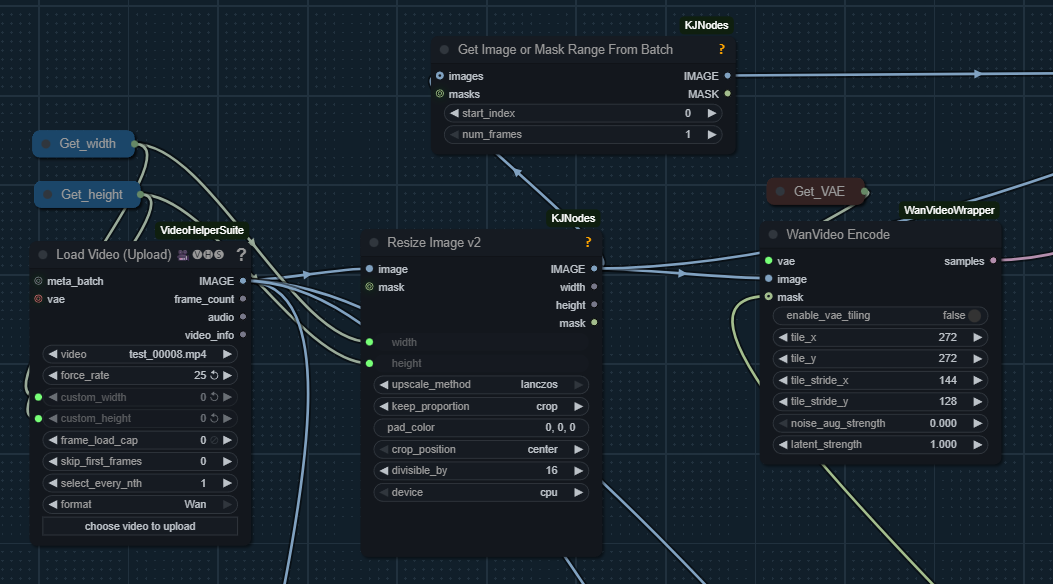
Apparently it has long been possible to use masks when doing V2V processing via I2V models. As of now this website doesn’t contain a complete workflow, however here is a hint into how to setup such workflow: i2v-masks
I2V Keyfarming
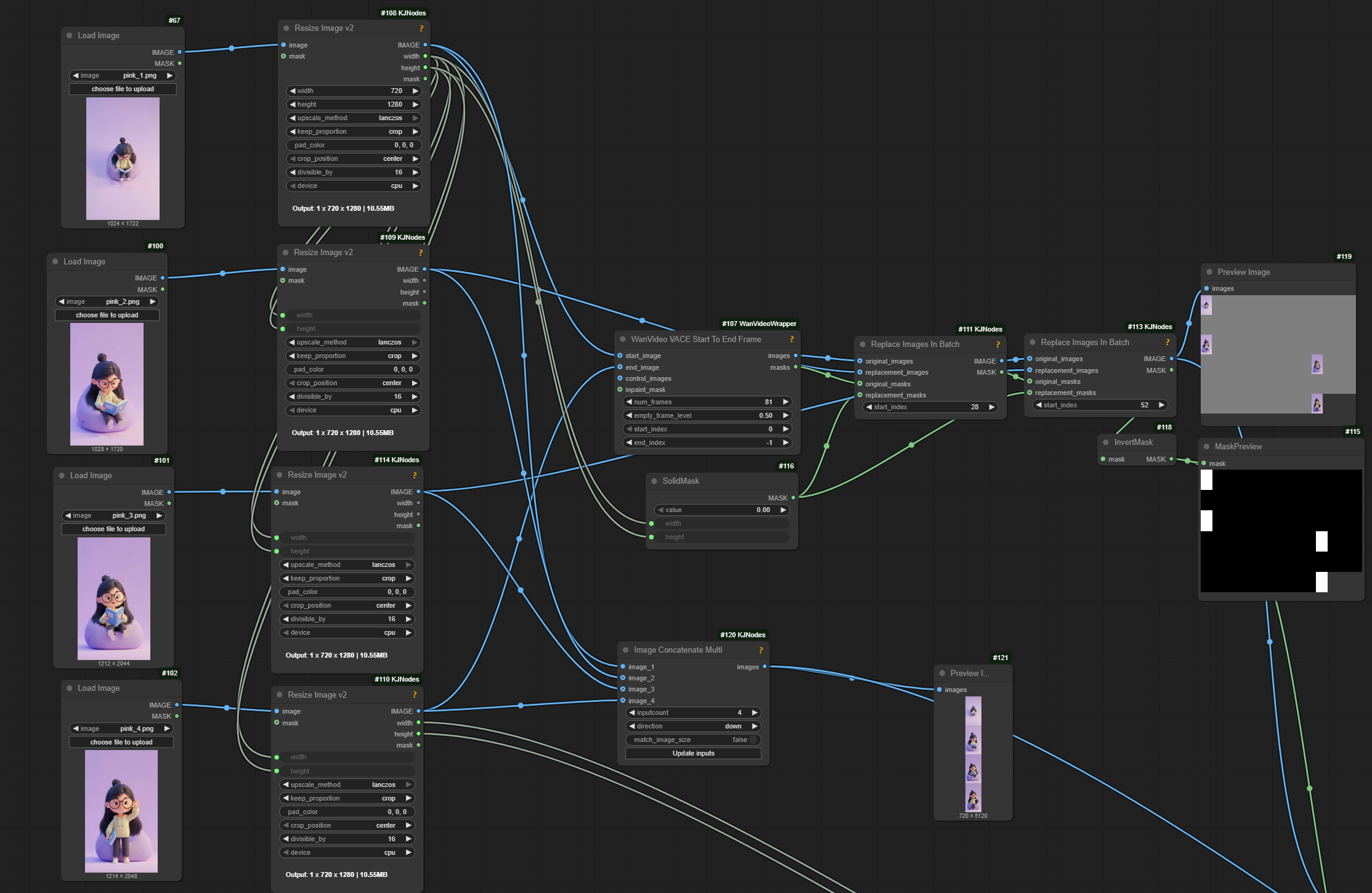
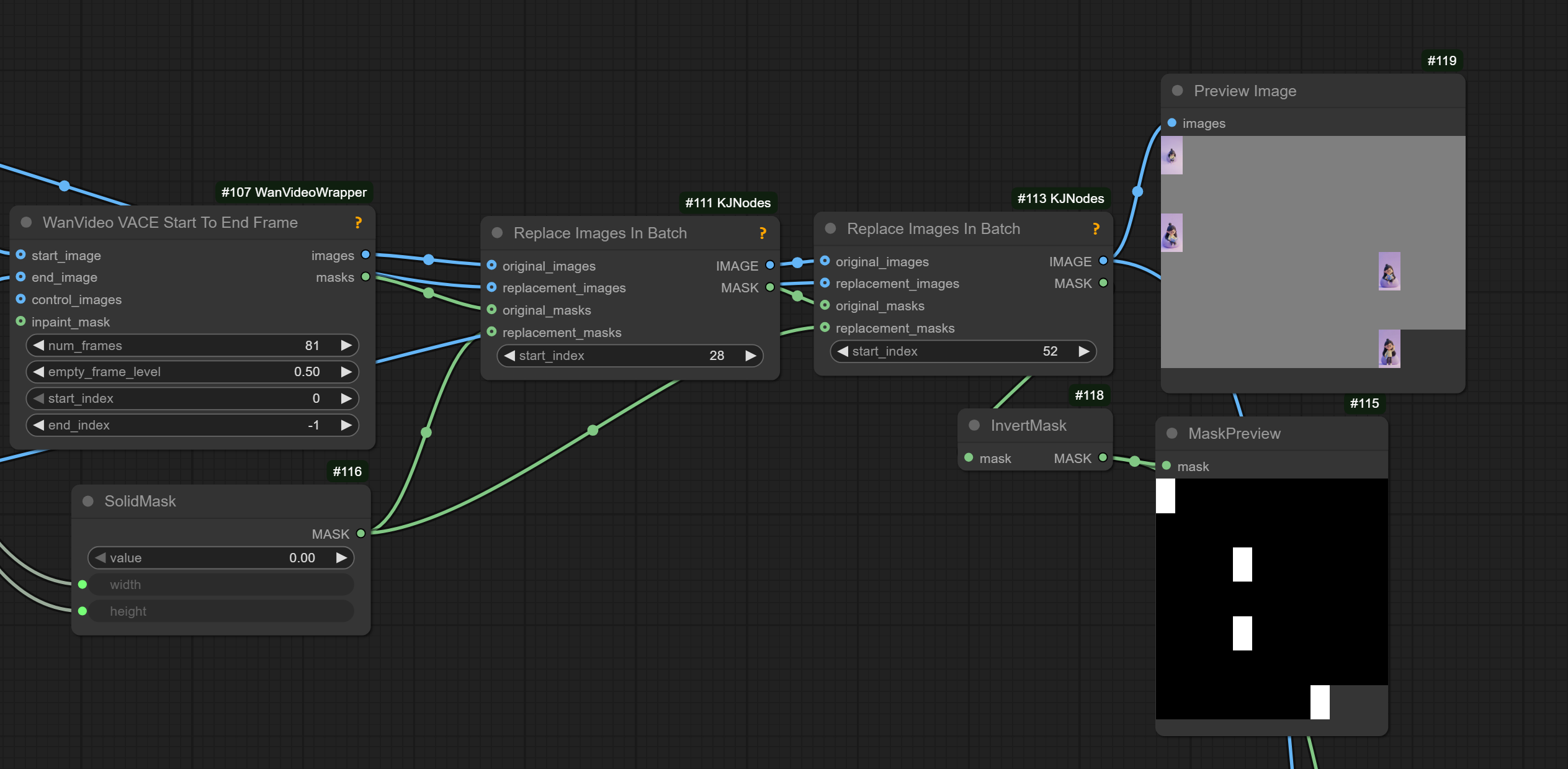
It has been proven possible to supply middle frames to I2V in addition to start/end frames. Workflow building hints:
- wrapper-wf-fragment the wrapper I2V node already does that, you can use the VACE start/end frame node to create the batches and masks, and that goes into the start image and temporal mask
- wan22-i2v-middle-frames
- full wf - fixed (earlier this page had a link to this which was likely an error)
- work-in-progress wf from VRGameDevGirl; “Q: HIGH model 2.2 to generate general motion, and HUMO as LOW model to refine and do lipsync? A: you can use any model as the 1st pass: t2v + VACE, Wan2.1FLF, magref, Wananimate”
FFGO
New high/low Wan 2.2 I2V LoRa-s which allow supplying subjects/objects and background all in the 1st frame on white background
Workflow building hint Prompt: ad23r2 the camera view suddenly changes ...
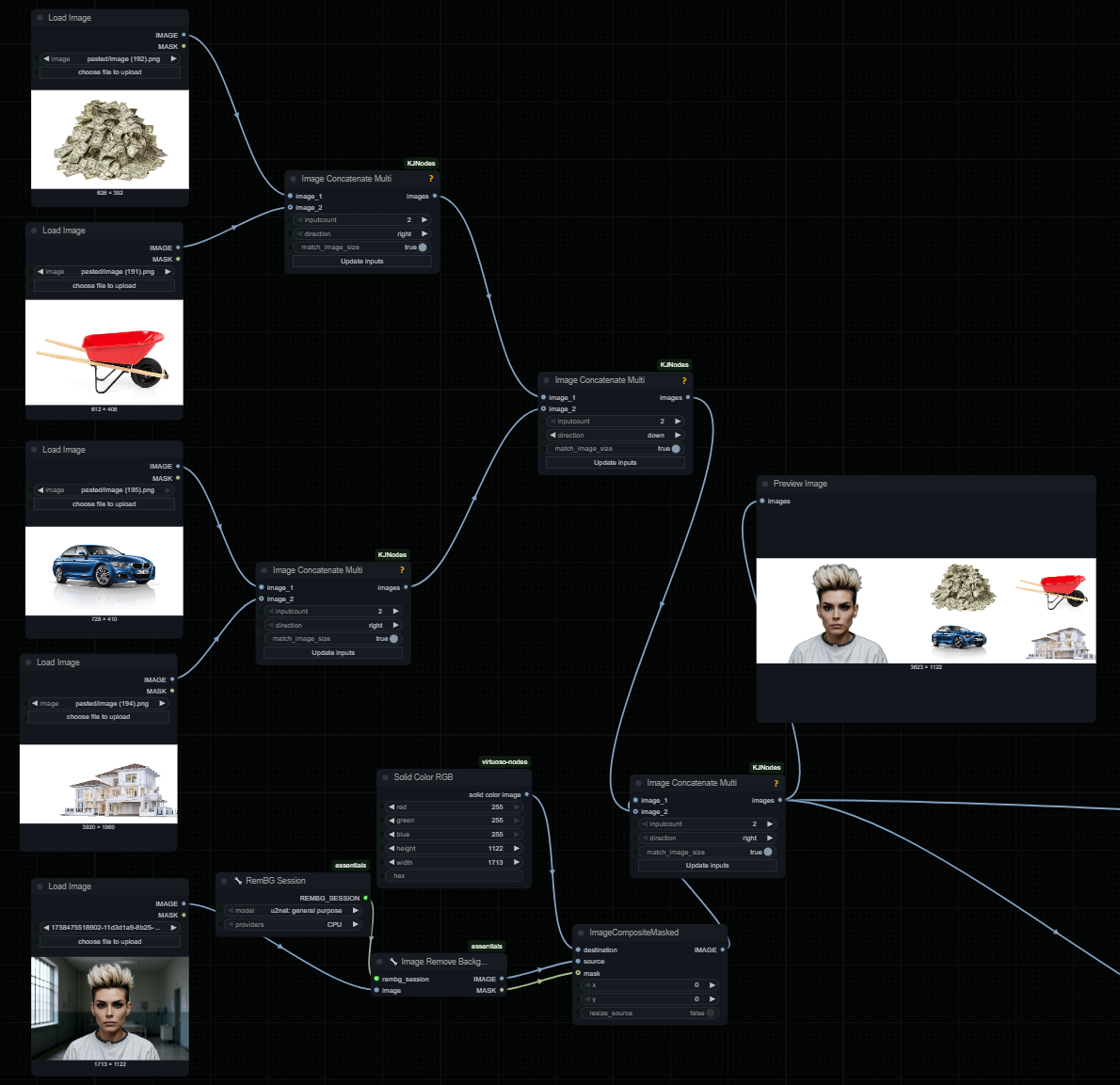
Works well for anime characters.
Apparently works with holocine
An artist:
tested FFGO … more trouble to set up correctly … than i would like to spend time
TimeToMove
Insipired by time-to-move/TTM, a promising body of code for converting rough mock-ups into smooth AI videos
which re-juvenates an old approach which existed as early as CogVideoX days Kijai added
WanVideo Add TTMLatents node now in kijai/ComfyUI-WanVideoWrapper
and provided an example wf
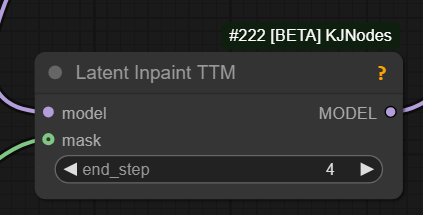
Additionally Kijai has added Latent Inpaint TTM node to GH:kijai/ComfyUI-KJNodes bringing TTM support to native workflows. Latent Inpaint TTM example,
workflow screenshot.
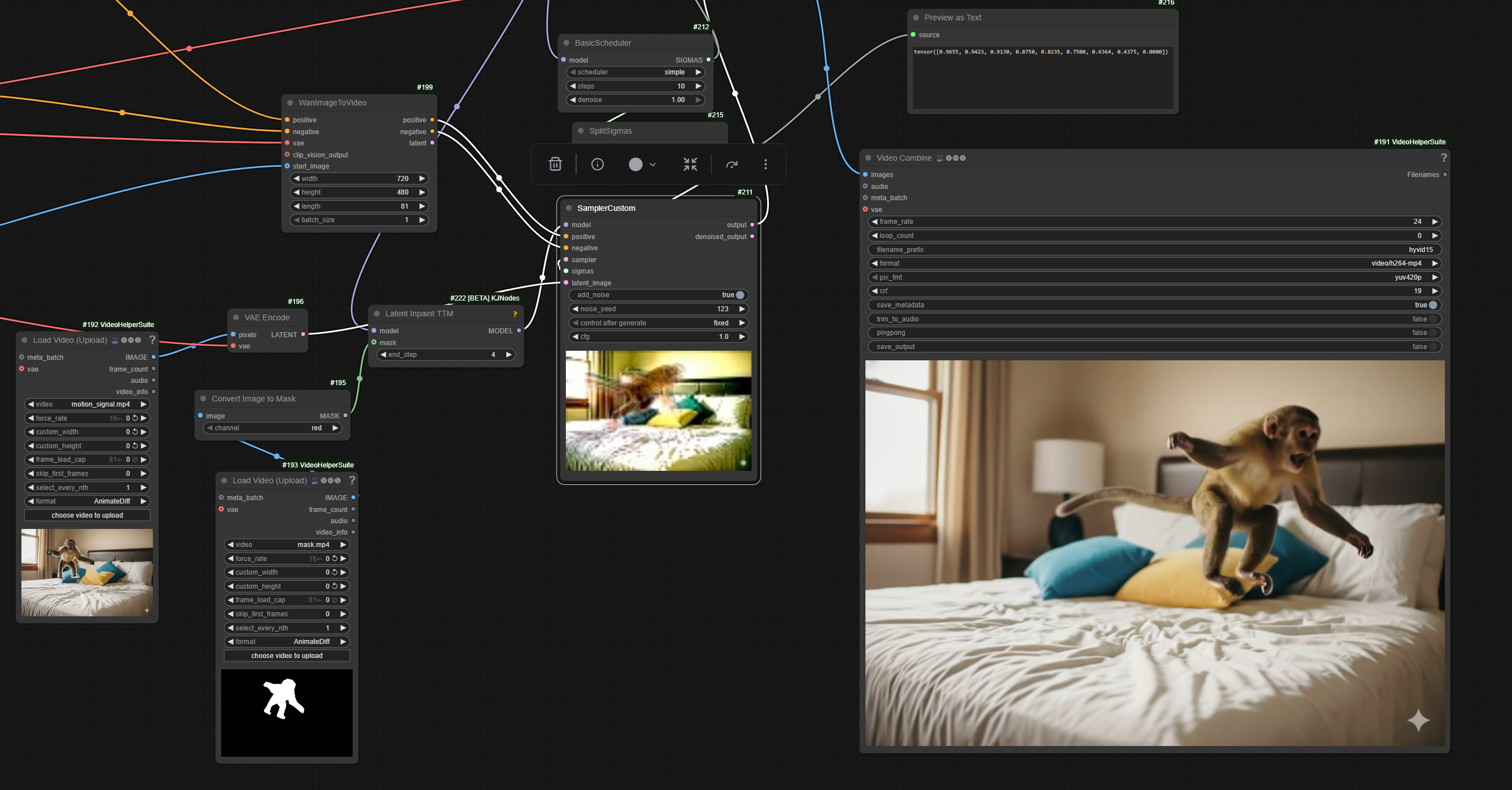
The workflows are not very easy to use and require a fair bit of trial and error. Official tool is used to generate driving video. Mockups use character pictures with a white outline around them.
TimeToMove Workflow Setup Details
Low noise step is somehow more problematic. Removing Lightx2V on low seems to help a bit.
General advice is to only use 1030 lightx2v LoRa on high - or no LoRa at all. People have been trying setups both with and without a speed LoRa on low. Apparently if using a speed LoRa on low then accurate prompt becomes very important.
One no-LoRa setup shared:
50 steps, 25/25 split, 3.5 cfg, 8 shift and 3 start and 7 end step
unipc may be a good scheduler to use. In order to use dpm++ it is advisable to
stop the reference one step before the last step of high noise
VRGameDevGirl’s wip native wf.
TimeToMove Masks
The process requires that a mask is supplied.
- One approach is to take the “control” (e.g. rouch mockup video which is already being fed into the process) and pass it via
Convert Image To Maskand then connect tomaskinput. It’s possible to take on one of RGB channels - Alternatively success has been reported with supplying a solid black mask
TimeToMove Ideas
GH:kijai/ComfyUI-KJNodes also contains Cut And Drag On Path node.
GH:wallen0322/ComfyUI-AE-Animation contains AE Animation node which is another good way to prepare control videos for TTM.
GH:Verolelb/ComfyUI-AE-Animation-English-Mod a fork of the above fully translated into English. Additional flip and scale features.
Half-cooked 3d can be supplied. One way to produce:
blender, put the image on a subdivided plane and use the depth map to displace the geometry, then animating the camera
DepthAnything 3 can be useful generating .glb. Possibly MoGe. Possilby https://huggingface.co/spaces/facebook/vggt
Try reducing the end step on the LTT node, you might get more motion, so wan is a bit more free earlier during sampling to generate motion since it won’t stick as close the reference
It has been hypothesised that having the moving character both as part of the initial image and as part of the control video increases the chances of creating an unwanted 2nd copy of the character.
If we want TTM to follow the movements of the original video without adding characters or anything else not requested in the prompt, setting fewer steps on the TTM node helps. .. 2 steps out of 6 steps … and maybe the denoise should be between 0.7 and 0.8
TTM Without TTM
It has been discovered that specially constructed V2V workflow around Wan 2.2 I2V achieves results similar to TTM and/or FFGO without either of them.
- put two people side-by-side facing front into one reference image
- supply it 4 times
- put background as 5th reference image
- create driving video similar to TTM, encode it to latents
- plug it into the 1st Wan 2.2 I2V sampler as latents
- set denoise to 0.7-0.8, enable add_noise on 1st sampler
No WF currently available.
FFGO without FFGO aka VACE at Home aka Phantom at Home
Discovered in Wan 2.1 times I2V model is capable of using FFGO style references on its own. The trick was to place the reference into starting frame and issue a prompt like
Immediate cut to a new scene, a laboratory. The item at the start of the video is on a man’s wrist
Painter I2V
GH:drozbay/WanExperiments now contains
WanEx_PainterMotionAmplitude which allows to do Painter I2V-style
trick in regular workflows, e.g. it makes Painter I2V approach modular.
The node generates positive/negative conditioning that can be connected to sampler nodes using I2V family
of Wan image generation models.
princepainter/PainterI2V node attracted attention and sparked research. It exists into two versions
The node was created to inject more motion into I2V generations with speed LoRa-s. It works by preparing noise latents in a special manner.
Here are some quotes about it: “It’s pre-scaling the input latents”; “it tries to balance out the brightness increase you normally get when scaling the input like that”; “basically adding some of the input image to what’s normally gray in I2V input”; “I think the logic behind using the reference partially in those frames is to keep the color from changing”; “this is what it does to input image: invert and blend to gray” (input latents); “definitely changes something” - “thing is it’s randomness, if you added noise controllably then you could also make a slider that changes the output”
Apparently the node subtracts the initial image from initial noise on all frames. While this does change the end result of generation the change can be both positive and negative.
Painter FLF2V
Same GitHub account, now an FLF node: link
PainterLongVideo
princepainter/ComfyUI-PainterLongVideo from that same authrow is being played with. Expert conclusion however is that the node is either simply an automation I2V extension via last frame or possibly also Painter I2V on top of it.
looking closer at PainterLongVideo and the code just … only one part that attempts to use multiple frames from the previous video, and it feeds that into a conditioning parameter called “reference_motion”, which is … only ever used by the Wan S2V model; other than that it appears to be just standard last frame to first frame continuation with the PainterI2V motion amplitude added in
Masks
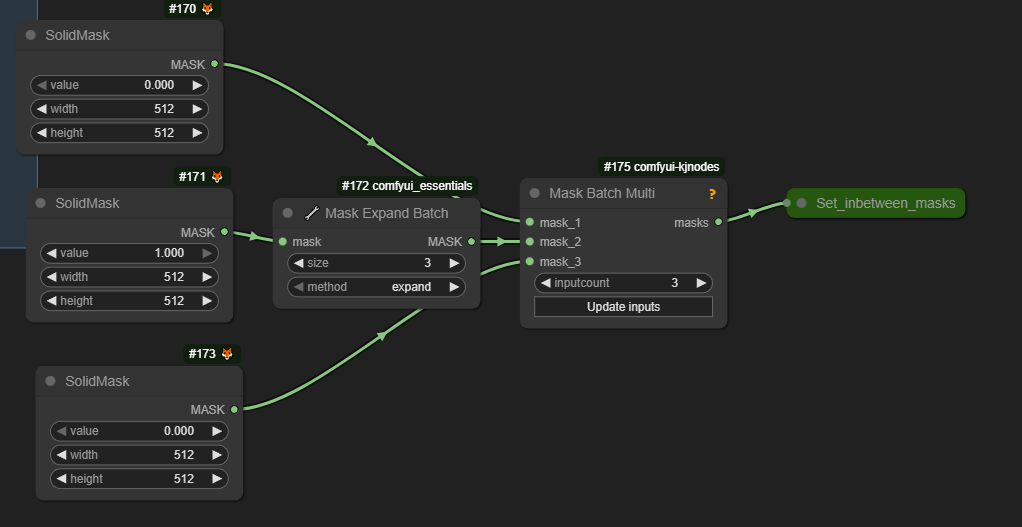
Here is a slightly non-traditional way to build masks. Please note that actual value 0 vs 1 may be opposite between wrapper and native workflows.