wanx-troopers
Hidden Knowledge
2026.07
On running int8 models:
need cuda130+ too (pytorch build and driver support, not the toolkit
[not PyTorch: 2.11.0+cu128 but +cu130]
djbfilmz:
I turned off “enable_fp16_accu” and bypassed “torchcompile” and now it’s seems to work
2026.06
Q: is there an easy way to merge loras with ltxv23 distilled model?
prab100 A: There is merge_lora_with_model in musbubi tuner ltx fork. Donno if it works with distilled.
Wan runs on fp16 [not bf16]
fp16 is faster (with the fast accum) and better than bf16 when it works
bf16 is safer and many models require using it
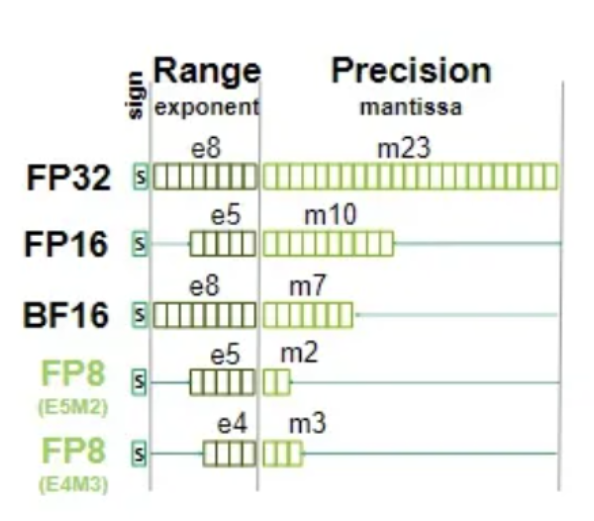
5090 can run on fp8 or mxfp8 which is lot faster
GGUF is kinda pointless format for diffusion models
Image Transform KJ node allows cropping a video
Ingi released systms-ai/TimeSlice-Nodes which implement a bit of AE style motion graphics effect in ComfyUI
2026.05
Script to convert LoRa-s to comfy format by renaming keys, from Gleb Tretyak: convert_to_comfy_lora.py.
GH:kijai/ComfyUI-MemoryVisualization - VRAM monitor for ComfyUI, just use it :). To move node around hold CTRL.
the newer quants have per layer setup where we set which layer is allowed to run with fp8 matmuls, and those work without any flags
crystools to monitor GPU temp during runs.
Q: can a 3090 use fp8?
it can, you just don’t get any speed up besides from the memory savings
gh:phazei/ComfyUI-Enhancement-Utils cpu/gpu/ram monitoring for pc in comfyui
Dragon on working on an image:
Started in MJ, then popping it into comfy with an ollama qwen3.5 uncensroed model to describe that and then gen in juggernaut. I cycled that loop by feeding the prompt qwen makes back into MJ a few times and then dropping best result back into comfy … 3 or 4 iterations in
I chose Qwen3.5 over Gemma4, which is way faster, but the vision capability of both these models in ollama differs greatly. Gemma4 will interanlly squeeze all images down to a fairly low detail and miss a lot of stuff in an image. Qwen scales with the input dimensions, so it can actually take huge input images (it really slows down though) so I ultimately decided Qwen was the better choice … In theory you can set Gemma4 internal scale and get it to see more details but at the time of testing, a week or two ago, ollama didn’t support this yet, and the comfy nodes have no way to pass the flag even if it did.
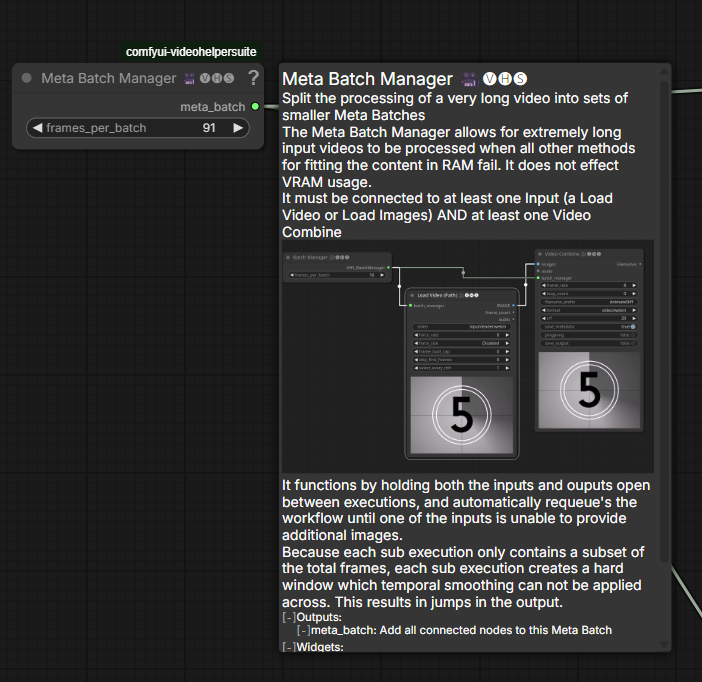
vhs-meta-merge-batcher Drozbay: The meta batch manager is just to deal with large numbers of pixel frames. Like loading and saving really long videos without exploding your RAM.
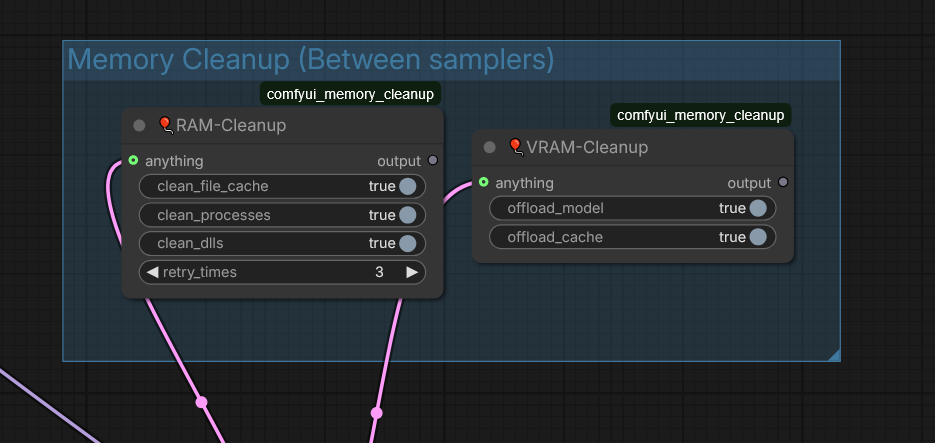
comfyui_memory_cleanup nodes help cleanup VRAM when ComfyUI’s native dynamic memory management does not cope.
BNP4535353:
I have a switch specifically for controlling high-frequency details, making image processing much easier than video processing. Just eta noise
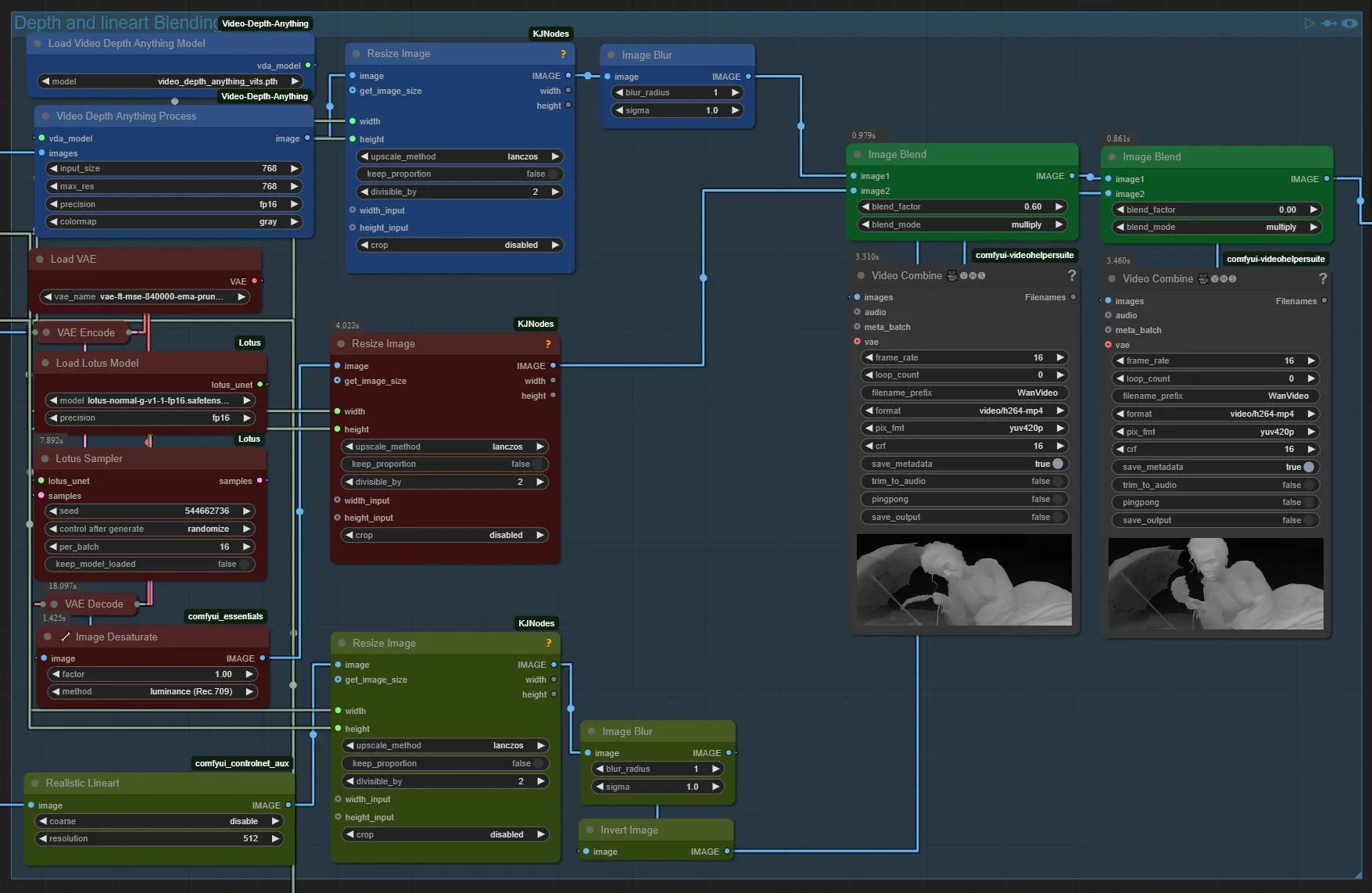
Q: What are you using normals for? David Snow: advanced preprocessors that combine depth, desaturated (B&W) normals and lineart. If you combine depth and normal passes David-Show-normals-for-depth-map-detailing
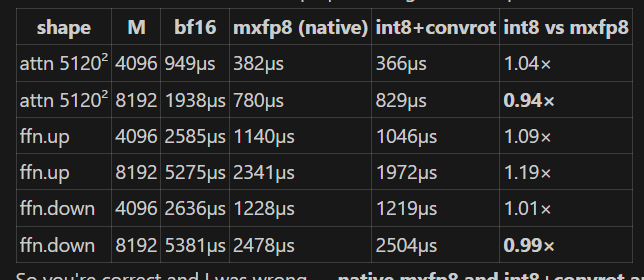
BobbingtonJJohnson on INT8 vs MXFP8, TLDR qaulity-wise: GGUF Q8 > INT8 ConvRot > MXFP8 > FP8 >= INT8 R:int8_in_the_age_of_mxfp8_an_investigation_into see also by same author: HF:bertbobson/ComfyUI-INT8_ConvRot GH:BobJohnson24/ComfyUI-INT8-Fast
As of end of 2026.05 Load Video (Path) is much faster than other variants from VHS.
2026.04
bbox is a bounding box
VAE already falls back to tiled if runs OOM but to save time ppl who know will OOM go tiled from the start
Richard Servello on LTX 2.3:
16GB here. Still need tiled vae. with proper noise and overlap you can make the lines disappear
Adapt a “diffusers” style LoRa to ComfyUI, courtecy of Screeb
import safetensors.torch
sd = safetensors.torch.load_file(input("Enter path to lora: "))
sd_out = {}

for k in sd:
  sd_out["diffusion_model.{}".format(k.replace("lora_down", "lora_A").replace("lora_up", "lora_B").replace("lora_unet_", "").replace("_blocks_", "_blocks.").replace("_img_", ".img_").replace("_txt_", ".txt_").replace("_linear_", ".linear_").replace(".down.weight", ".lora_down.weight").replace(".up.weight", ".lora_up.weight").replace(".processor.proj_lora1.", ".img_attn.proj.").replace(".processor.proj_lora2.", ".txt_attn.proj.").replace(".processor.qkv_lora1.", ".img_attn.qkv.").replace(".processor.qkv_lora2.", ".txt_attn.qkv."))] = sd[k]

safetensors.torch.save_file(sd_out, "converted_lora.safetensors")
blogs.nvidia.com/blog/ai-tokens-explained
2026.04.16
Q: thats to be expected though right? gguf q8 should be better than fp8? A: yes, just 30-40% slower on hardware that supports fp8 matmuls
2026.04
Get Latent Size & .. from KJNodes to get size of video in latent frames.
mxfp8_block32 is good for Blackwell users
2026.01.10
Drozbay’s preferred values to put into ClownOptions Extra Options for ClownShar sampler workflows
default_dtype=float32
multistep_initial_sampler=euler
multistep_fallback_sampler=ddim
multistep_extra_initial_steps=0
skip_final_model_call
2026.01.03
did full support for mixed quants get finished in comfyui? yeah but needs either a dict included in the model that defines precision of each layer, or the new quant keys comfy added; The comfy mixed format includes info for each layer with settings such as what precision the activation uses and whether it can use fp8 matmuls etc
Apparently the newer models Kijai converted to mixed precision have metadata making the suitable for both wrapper and native. However the older models converstions might be limited to wrapper only.
2025.12.31
Models with control like VACE can go over 81 frame limit
Basically with control you just lose video quality, while motion quality is fine due to the control When you go past what model is trained with
2025.12.30
cpu_cache is potentiall an important parameter on VAE with influence on results?…
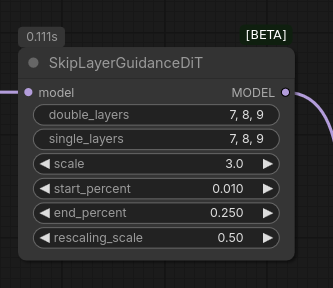
SkipLayerGuidance node for advanced uses
WanVideo Encode node has got noise_aug_strength setting which scales the latent values.
2025.12.29
Re Wan 2.1 lightx2v LoRAs: “720p T2V isn’t different model actually; their releases have been highly confusing”
EulerFlowMatch scheduler for ZIT
2025.12.28
most blackwell should probably be clock limited or undervolted as a baseline [advise on using RTX5090 etc]
- Linux: use nvidia-smi but it won’t let you go below 400watts
- Windows: use msi-afterburner
WanVideo Encode has latent_strength parameter which scales the latent values.
The expected effect is that the latent provides a weaker constraint to how the resulting video looks
when the corresponding image is part of conditioning.
Load Checkpoint node loads AIO (all in one) .safetensor files: model, clip, vae from one loader.
2025.12.27
Tensors in comfyui are usually aranged in BCHW format. (Batch Channel Height Width); I2V models will have a value of 36 for the channel tensor. Anything else will throw an error. T2V will be 16 for the channel tensor. You should not mess with the tensors unless you really know what you are doing in which case you can pad them etc. Trying to mix and match i2v and t2v models will cause tensor mismatch errors
Sure, but you can force it sometimes and it may still work, for example uni3c is for I2V but works on T2V if you just slice the extra channels off. Other way around usually not, for example even if you force apply vace to I2V model, it just ruins the output
can you do 4 steps WITH cfg? With low cfg yes, under 2 usually
You can also just do first step with cfg; works better with at least 6 steps
Lemuet:
Nunchaku is 4bit quantization, so smaller model files and faster generation speeds. Quality hit … … it used to be really impressive how much faster it was compared to something like fp8
2025.12.22
TeaCache (and MagCache) is tuned per model so it wouldn’t work properly [for Logcat Avatar], EasyCache is model agnostic and should work; it’s generally better to set high step count and then adjust the threshold so it drops ~30-50% of the steps [with EasyCache]
Scruffy:
Loras will ALWAYS overlap, depending on what they affect. Not a Zimage problem. Think of them as transparent plastic overlays… you can stack up a bunch, and some will play nice, and others will overlap and not make sense/work well together.
Comfy native usefully has ImageScaleToTotalPixels
2025.12.17
I2V Encode in Wrapper has fun_or_fl2v_model toggle which needs to be enabled for example to make a loop video
it only affects how the last frame is encoded if provided; Fun and first to last frame - model work with the last frame just being last video frame, 2.2 as well But normal I2V requires last frame to be encoded on it’s own
off = encode last image on its own, just like first image on = just insert last image as last pixel image and encode all
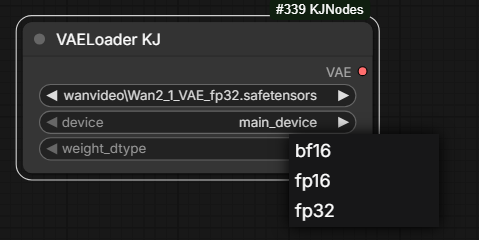
The point of VAELoader KJ from KJNodes
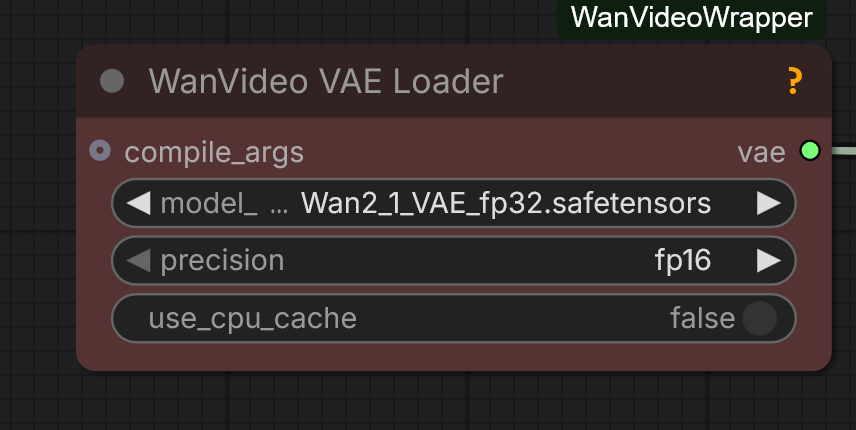
and WanVideo VAE Loader from Wrapper
is to be able to run fp32 Wan VAE in bf16, fp16 or fp32 modes
if you use a fp8 scaled diffusion model, it’s still actually using fp16 or bf16 to do all the calculations, only the stored weights are in fp8. They get upcast and scaled on the fly
I had to start comfy with
--preview-method autoto get previews to start working again [in KSampler] [there’s also –preview-method taesd]
Using parenthesis in the prompt like (16:9) can break generation with Wan.
2025.12.16
Discussion: as a mitigation of issues with SCAIL the possibility is being considered of adding an extra pose guidance frame at the front and then cutting it since 1st frame often comes out in a low quality. Apparently a similar trick is used by VACE
what I mean is that the frame where you want the pose to start is clean, so you can just cut the start off now? just like how VACE does it
WanVideo Empty Embeds is for T2V models
2025.12.15 Piflow
link - 4-step Qwen image distill
Piflow is the novel Adobe backed distillation method that doesn’t really “sample” in a classical sense - maintains seed variation - and is super quick (2-4steps). They released models/nodes for QWen and Flux.dex (also Flux2 a few days ago but no Comfyui support yet). They … haven’t yet shown that the Pi-Flow method can work with video models.
2025.12.14
fp8_fast mode in WanVideo Model Loader is good.
the wrapper doesn’t handle [VRAM offloading] so well as native does; native calculates the amount that needs offloading; wrapper just offloads everything
LoraExtractKJ from KJNodes will not work on fp8.
The differnce between offload_device vs main_device in WanVideo Model Loader
can only be observed when either the models are small
or the GPUs are huge and can keep the model on VRAM at all times.
SPDA is a lot slower than ageattn; GGUF Q5 is somewhat slower than fp8 in general
2025.12.12
Clowshark samplers carry additional information such as conditioning and model along with the LATENT. It only changes when you manually change it.
Great tool to help understand nodes and workflows:
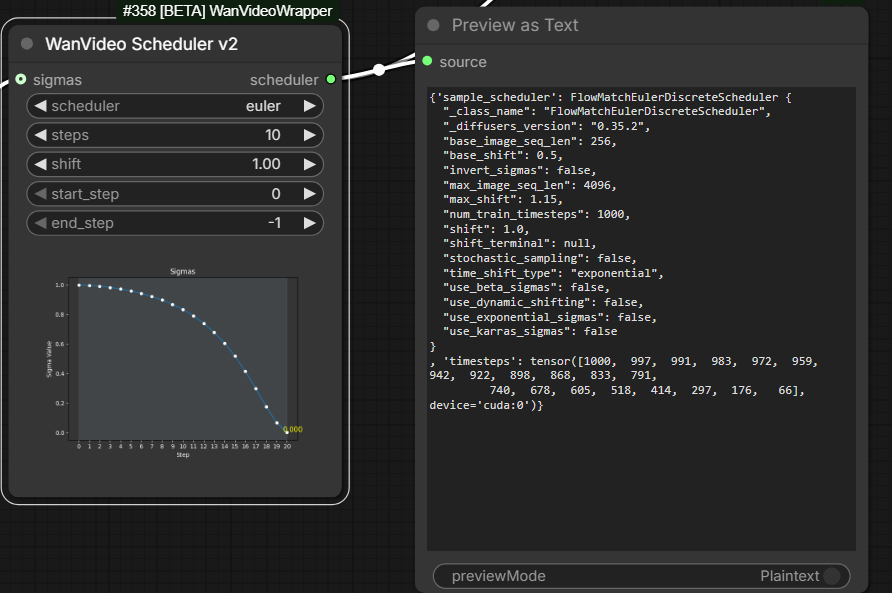
The following error may mean the model is returning NaN values; solution can be to try a less quantized model
blck gens; RuntimeWarning: invalid value encountered in cast
return tensor_to_int(tensor, 8).astype(np.uint8)
2025.12.11
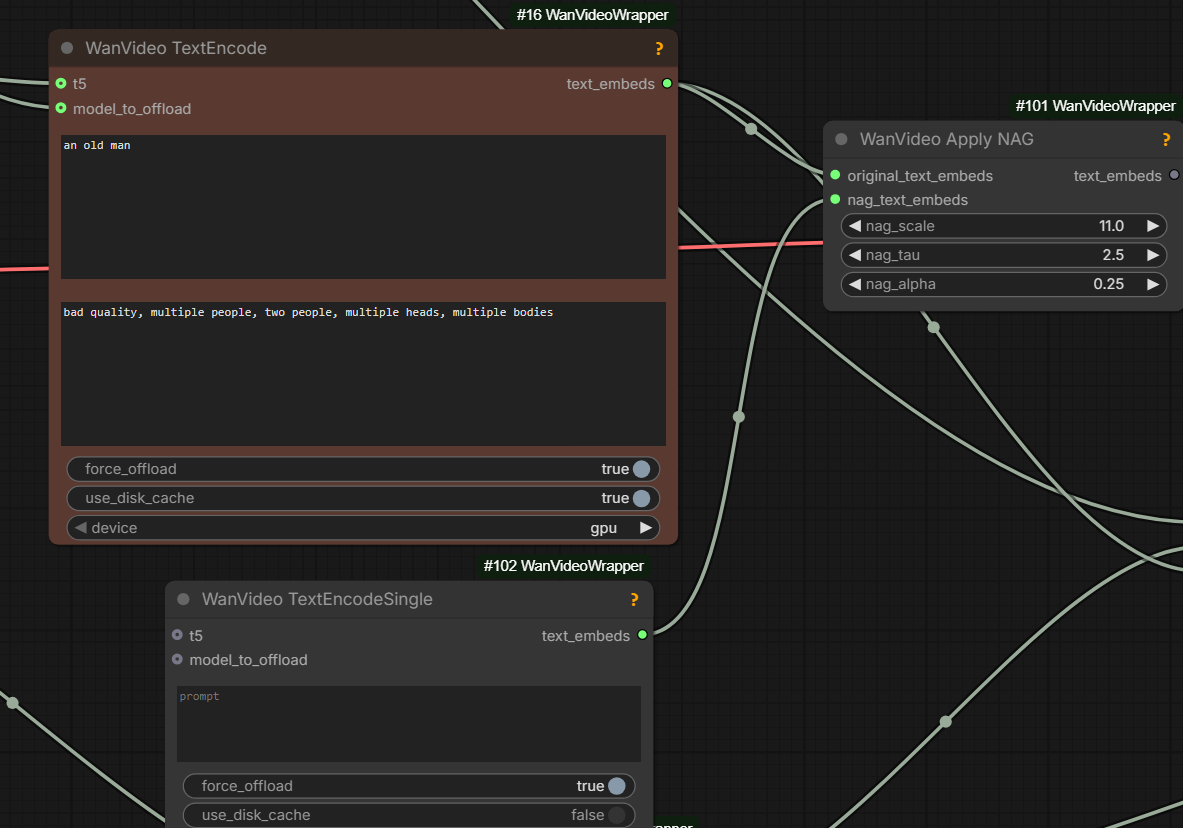
positive and negative [prompt] are two different model passes; NAG is additional attention in the positive pass; NAG is a lot less powerful than a true negative prompt because it doesn’t take into account the MLP blocks in the same way, so it should probably be a more simple negative [prompt]
In general when it comes to NAG, the NAG negative prompt should be much simpler and only have things you don’t want to see, it shouldn’t be the generic negative prompt word salad
NAG is not used when cfg is used; For the steps that use cfg, the empty prompt would be used
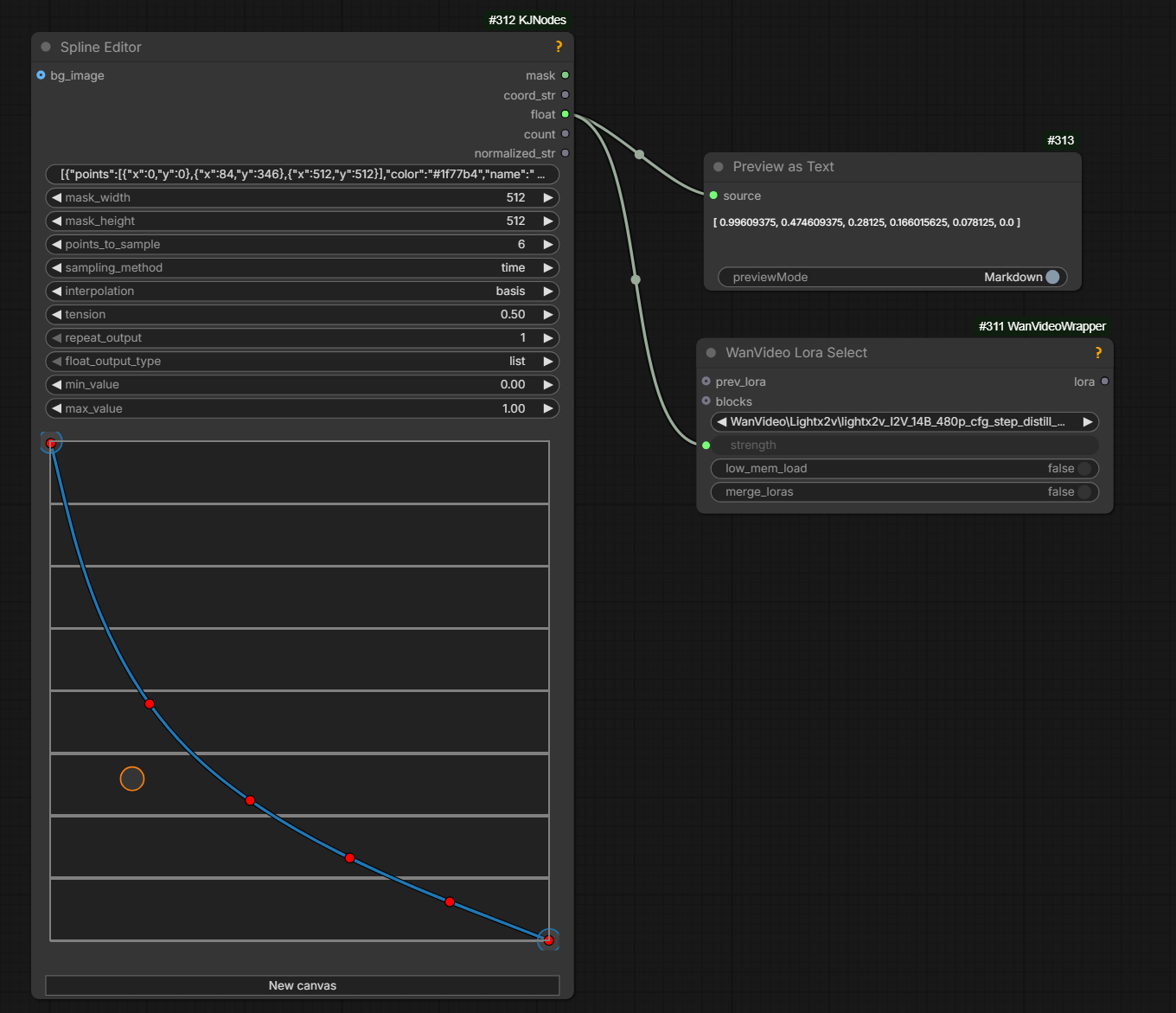
KJNodes pack contains nodes for scaling strength of unmerged LoRA-s with step: kj-lora-strengh-scaling.
2025.12.10
Any sampler with “SDE” in the name is adding its own noise on each step. SDE = stochastic differential equation.
Pretty much in comfy sde means “add noise every step”. There are other ways to solve an SDE but not in comfy.
WanVideo TextEncoder Cached from Wrapper is the smart and fast text encoder for repeated runs caching encoded prompt on disk.
upscale first (seedvr) then rife or vice versa? upscale first. Rife is fast, or at least Fill’s implementation of it
2025.12.07
quantization which can be set to values like fp8_e5m2_scaled in WanVideo Model Loader
is there to downcasts the weights to a lower precision when possible.
quantization of fp8_e5m2 without scaled is “the worst way to use the model”.
quantization generally is “just a fallback”, it is slower to load;
if VRAM is tight the advice is to “either use scaled fp8 or GGUF
or “disable quantization and use max block swap”.
quanatization not possible with scaled .safetensor-s, “just keep it disabled”
Mixing fp8_e5m2_scaled VACE with fp8_e5m2 Wan 2.2 T2V can cause mysterious errors.
resolution doesn’t affect RAM usage, only the model size and loras do
2025.12.03
Wrapper contains Wan Video Prompt Extender node; it uses Qwen2.5 3B or 7B from KJ HF.
SaveLatent and LoadLatent nodes from ComfyUI native can be used to save/load latents to/from file.
Connect output from LoadLatent to samples input of WanVideo Sampler if needed.
it’s just clumsy to use because … it saves to output folder but load only looks from input folder
Running high with CFG 3.5/3.5/3.5 improves prompt adherence compared to 3.5/1/1.
Comfy native contains Empty Audio node.
2025.12.01 - VRAM Saver
Wan VAE can use way less VRAM in wrapper if you offload the cache to CPU, makes it also a lot slower, but still beats tiled VAE at 720p it’s like ~5GB less VRAM used
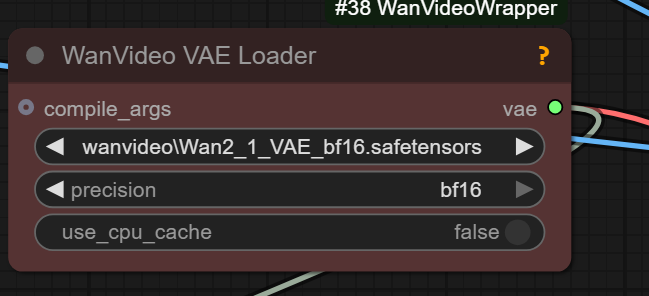
To similarly save RAM in native use WanVideo LatentsReScale node and plug wrapper VAE node into a native WF.
2025.11.30 Chunked RoPE - VRAM Saver When Torch Compile Off
Two of the highest peak VRAM hits on the model code are the RoPE appllication (rotary positional embeds) and ffn activation (feed forward), these happen separate from the attention, which is the 3rd highest.
The chunked option splits both the rope and the ffn calculations, doing it in chunks and thus reducing the peak VRAM usage to below the attention (which cant really be split without affecting results or slowing it down);
torch.compilealso optimises it similarly, that’s why it uses less VRAM when it works.
pytorch now has the fused
RMS normbuilt in, that was one of the biggest benefits of compile; you could just not use compile, use the pytorch RMS norm and the chunked rope
2025.11.30 rms_norm_function - Time Saver When Torch Compile Off
WanVideo Model Loader: set rms_norm_function to pytorch not default for faster gens if torch is new enough and torch compilation is off.
No time saving if torch compilation is on.
2025.11.30 sageattn
sageattn and sageattn_compiled refer to Sage Attention 2; if you had Sage Attention 1 installed for some odd reason they’d refer to it instead.
Sage Attention 3 can be installed at the same time as Sage Attention 2, so there is a separate option for it sage_attn3.
The only difference between
sage attentionandsage attention compiledwas that the latter ALLOWED for torch compile; normally compilation is disabled for sage as it wouldn’t work anyway, and just causes unnecessary warnings and such; even with the new sage it still doesn’t actually compile it, the code just handles it graciously so there’s no graph breaks.
sageattn_compiledis sort of redundant now with latest version of the wrapper as the workaround to allow even the old version in the graph seems to work now
Difference now is that normal
sageattnis wrapped in a custom op so nothing in it is compiled (but also doesn’t cause graph break) and thesageattn_compileddoesn’t wrap it at all, but expects you to have the very latest version of sageattn that has built-in similar workaround
fullgraph feature in torch compile is a debug feture; it will error if there’s any graph break
2025.11.30
this was even more relevant for Kandinsky5 because it has the 10 second model, and it’s 24fps, so that’s 241 frames to do at once but same applies to Wan
xformers: No use for it with sageattn being so fast; been ages … back then it was maybe 5% ahead of sdpa
Unload Modulesin ComfyUI manager can potentially fix weird VRAM issues
Note cfg usage(>1.0) increases resources consumption
disable smart memory in ComfyUI - then it always offloads [does not try to keep models in VRAM to avoid unnecessary RAM - VRAM transfers]
Drozbay
drozbay is continuing to push boundaries on what can be achieved aroud Wan models. His nodes discussed on this website reside mainly in the following code repositories:
| Drozbay’s Repo | Purpose |
|---|---|
| GH:drozbay/ComfyUI-WanVaceAdvanced | Nodes for advanced Wan + VACE generation |
GH:drozbay/WanExperiments aka WanEx |
Nodes for preparing and examining embeds in new ways |
List of Drozbay’s contributions discussed on this website:
- Drozbay’s Study: nodes in
WanExto compose/examine Bindweave and advanced I2V embeds - HuMo - Drozbay: HuMo continuation workflow
- SVI-shot:
WanExcontainsWanEx I2VCustomEmbedswhich works well with SVI-shot - Drozbay’s Impact Pack SEGS Detailer For Wan Video And VACE
- Painter I2V Modular Replacement
WanExcontainsWanEx_PainterMotionAmplitudenode which replicates action ofPainter I2Vnode in a modular manner - Wan I2V T2V / VACE Tricks hoists avdvanced workflows created by Drozbay
- Wan 2.1 to Wan 2.2 LOW LoRA
Mega List of Drozbay’s Works
- GH:drozbay/ComfyUI-WanVaceAdvanced
- GH:drozbay/RES4LYF - though it can be these have been (mostly?) integrated into main RES4LYF repo huddadudd: i’ve been on that fork for almost a year probably [not sure if mask issues resolved in main repo]
- GH:drozbay/WanExperiments
- GH:drozbay/janky_memory_patcher
- GH:drozbay/VaceWanAdvancedTests Very very (very) experimental stuff
2025.11.29
Self-forcing can mean models that generate video portions progressively, small frame batch by small frame batch, thus enabling longer generations. Mainstream today’s models are not SF however. Existing SF models offer lower quality of results generally.
2025.11.27
res_2s runs about 2x slower compared to Euler, the advantage is that with the same number of steps a better result is delivered; 2x steps on euler is a fair comparison for res_2s; the hope behind using res_2s is to get more mileage out of the same .safetensors file
The Mystery of Denoise Control Knob
Denoise on sampler is a widely used but often misunderstood parameter.
In WanVideo Sampler e.g. in wrapper workflows
its function is simply to override start_step - it doesn’t do anything else.
It is less confusing to always set start_step and never touch denoise.
In native Sampler the code is more nuanced. One bit of advice we have is
denoise_strengthand steps are mutually exclusive and changing both at the same time leads to weirdness, especially with the usual schedulers and small step values.
2025.11.24
Full non-accelerated generation of AI videos delivers the greatest quality but takes a long time. Faster generation is achieved by adjusting the model weights. The process is known as “distillation” producing a “distilled” model. In most cases the difference between distilled and non-distilled model can be extracted as a LoRa. Distillation can proceed along two separate axes: cfg and steps. A model can be distilled in on both at the same time.
cfg distilled makes it work at cfg 1.0, meaning cfg is disabled and only the positive prompt model pass is done, meaning 2x faster inference
step distillation just makes it work with less steps
2025.11.21
Wan latent space is compressed by factor of 8 spatially, 4 temporarily
2025.11.20
res_multistep in Wan Video Sampler (wrapper) is probably similar to res_2s in other samplers (Clownshark?)
most people using res_2s and similar are not comparing it to other samplers at 2x the steps; not denying it can be better, just skeptical how much, at least with distill loras
2025.11.15
umt-xxl-enc-bf16.safetensors only works with the WanVideoWrapper;
native workflows need the model without the enc
like umt5-xxl-fp16.safetensors.
2025.11.14
noise mesh/grids/dithering problem with Wan models: originally believed to be
wan video is only usable with qwen image inputs because those are so soft that they do not cross into the detail level where the vae will fail into noise grids
but it looks like the actual explanation is
It’s triggered by the mismatch between real (encoded) and generated latents. Generated latents are usually blurry, although adversarial distillation like lightx (dmd2) helps sharpen the generated latents. The decoder doesn’t know how to handle blurry latents, they’re out of distribution, so it generates speckle/grid artifacts as its failure mode.
The generated latents are blurry. More steps, use lightx loras, disable sage attn if relevant. 2.2 low noise + lightning or lightx2v is pretty good at minimizing the artifacts
another idea
Doing a second pass with the T2V LOW model with a low denoise (around 0.2) can fix that
2025.11.11
When switching on tiling in VAE to save VRAM working with WAN models it is advisable to set temporal_size setting on VAE to more than the actual number of frames generated.
For example when generating 81 frames a setting of 84 is advised. Otherwise tiled VAE may introduce flickering.
Massively useful list of WAN-realted models, LoRa-s, controlnets: link
2025.11.10
Wan 2.2 vae is for the Wan 5b not the rest though
For wrapper implementations the “null” image is black. For native implementations the “null” image is gray. Also the masks are inverted.
2025.10.25
WanVideo Set Block Swap and similar nodes do not require re-loading .safetensors to make changes - that is why they’re separate nodes.
Earlier
By default safetensors files are loaded via mmap.
Kijai’s nodes can convert between data types such as bf16 at safetensors loading time.
load_device = main_device in WanVideo Model Loader means “keep model in VRAM”.
| Kijai’s Repo | Purpose |
|---|---|
| GH:kijai/ComfyUI-Sapiens2 | Sapiens2 implementation, experimental as of 2026.04.26 |
| GH:kijai/ComfyUI-WanVideoWrapper | Alternative to Native KSampler, “wrapper” nodes |
| GH:kijai/ComfyUI-KJNodes | Supplementary, can be used with Native KSampler |
| GH:kijai/ComfyUI-VideoColorGrading | ColorGrading |
| GH:kijai/ComfyUI-WanAnimatePreprocess | Nodes for Kijai’s WanAnimate workflow |
| GH:kijai/ComfyUI-MMAudio | Foley? |
| GH:kijai/ComfyUI-GIMM-VFI | frame interpolator |
| GH:kijai/ComfyUI-SCAIL-Pose | pose detector for SCAIL model |
| GH:kijai/ComfyUI-MoGe | adaptation of MoGe tool by Microsoft |
| GH:kijai/ComfyUI-MemoryVisualization | Painfully beautiful VRAM Monitor for ComfyUI |
Resolutions to try with WAN: 1536x864, 1280x768, 1200x960, 1/2 of that, 832x480, 1024x576, 1440x816
Resolutions to try with Ovi v1.1: 1280x704, 704x1280
Colored inputs on ComfyUI node designate non-optional inptus, rather than inputs that have something connected to them.
Q: why using block swap is hardly any slower than not using it?
Kijai: because it’s async; it swaps the next block while current one is processing; so if your step takes longer than moving the block, you don’t really notice; it’s the prefetch option in the node and non-blocking; even without that on fast systems it’s not a huge speed hit tbh
Too high CFG on low steps can cause “burns” and flashes.
Resize Image v2 once reported that a 150 frame 480x832 video was taking slightly bellow 0.7Gb.
There is only one CLIP that works with a particular class of model like Wan. It can be in different precision however.
ViT means “vision transformer”. h = huge, l = large.
RoPE
When using going beyond trained model resolution with a wrapper workflow can try using WanVideo RoPE Function.
Particularly with Cinescale LoRA can try setting this node to comfy and f/h/w=1/20/20 or 1/25/25; Kijai:
when you use cinescale.. you mean just the lora? or the rope scaling too?
really large resolutions should benefit from the rope scaling
well technically anything that goes past the trained resolutions should
I don’t really remember the values but in the original they used something like that
basically it’s scaling the spatial rope in attempt to make larger resolutions work without the repeat effect
possibly the lora is trained with the scale of 20
Defaults are 1/1/1.
Skimmed CFG
Skimmed CFG from Extraltodeus/Skimmed_CFG. High CFG in the sampler helps to follow the prompt, skimming prevents the burn issue.