wanx-troopers
Extensions
Wan 2.1 and 2.2 models are typically limited to around 5 seconds of generation. Some models have inherent capability to go beyond that but they need an external driving signal: WanAnimate, InfiniteTalk. An approach that remains mysterious to the maintainer of this website: ContextOptions.
However there is a separate host of solutions.
We can take an existing video and generate an extension to it.
The simplest form of doing this is to run I2V generation supplying last frame from previous generation as start_frame.
This works but does not preserve continuity of motion - characters start moving at a different speed, in a different direction, etc.
VACE Extensions
A method which has been practiced for a while is to supply several last frame from previous generation, say 16 as initial frames in VACE embeds. VACE masks need to be setup accordingly - so that these frames are preserved and subsequent frames are generated. Rest of frames need to be supplied as (127, 127, 127) grey frames.
VACE naturally works with T2V models.
One possible workflow from Verole: civitai.com/models/2024299.
I2V Extensions
As a more recent discovery it appears that a number of frames from previous generation can be supplied as starting frames into the next generation for I2V models as well.
Apparently Wan 2.2 I2V models can accept those frames without any additional LoRa-s or controlnet-like additions. Wan 2.1 I2V models did not have this ability however.
A common problem which accompanies this kind of generation are “flashes”. On those initial frames the 2nd generation would abruptly change overall image brightness, colors or exhibit some sort of a noise pattern. These typically last for a few frames only. Avoiding this kind of issues is an area of ongoing experimentation.
See also: Drozbay’s Study for additional details on how embeds can be preapred and examined.
HuMo Last Image to First Image Extensions
Degradation
Degradation remains an ongoing problem with generating extensions. Degradation takes two forms:
- if the character turned away in the “handover” frame(s) the likeness may be lost without some sort of reference - and not many models accept references
- video contrast tends to go up and colors tend to shift with each extra generation - this type of degradation is commonly referred to as “burnout” - again references would have solved this but it remains problematic how to supply them
SVI-shot is one way to supply a reference, however a method has not yet been found to use svi-shot and preserve continuity of motion. SVI-film may be a vible way to reduce “burnout” degradation; it would seem that we would need exactly 5 handover frames in this case - probably less than what we would have wanted to preserve continuity of motion - and this doesn’t help with character likeness problems. So right now it seems that we need to choose between countering character likenes problems and countering burnout.
It is believed that degradation might be happing as a result of converting data from pixel to latent space and back via VAE too many times. An idea that often comes up then is to avoid roundtripping and just take last several latents from generation of the previous segment and use them to kick-start generation of the next segment. This will not work however.
This is because the 1st frame in sequence is encoded differently to the rest in WAN latent space. It takes up 4x as much bytes and subsequent frames use it as a point of reference. If we simply chop off the last 4 latents from the previous generation (and this is 16 frames) they will not constitute a correctly encoded sequence of frames in WAN latent encoding.
SVI 2.0 Pro is a promising step in combating degradation in I2V generations. While it does not cure it completely there definitely appears to be less of it.
StoryMem is another similar attempt.
Clip Vision
There is an easy way to determine if a model is using clip vision embeds.
Look at the model on Hugging face and see if it contains a layer called img_emb.proj.
For models which do accept clip embeds this may be a viable way to counter both kinds of degradation.
Wan 2.2 models unfortunately don’t seem to be clip vision aware at all, expect Wan Animate which is 2.2 only in name.
Color Matching
Kijai announced native ColorTransfer node:
“the native color match node is now merged along with the native SUPIR support, it’s better than my old ColorMatch, fully on GPU and with more source match modes, so possibly relevant for LTX too”;
not for latents, purely for pixels
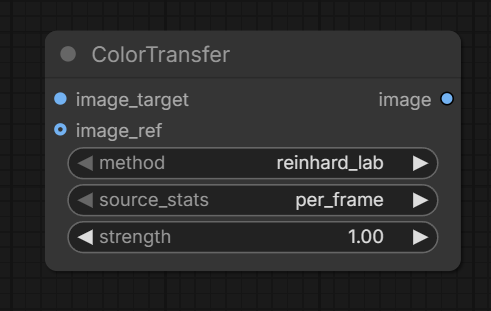
One interesting approach which can in theory be used in combination with any extension method is color matching. It has been tested in particular in combination with SVI 2.0 Pro and was able to successfully hide the fact that contrast/lightness had still a little driften after two extensions.
As bnp2704 explained
In its simplest form, a video is just a collection of many images
…so the innocent looking Color Match node from kijai/ComfyUI-KJNodes
which colormatches image to image is actually sapplicable to videos:
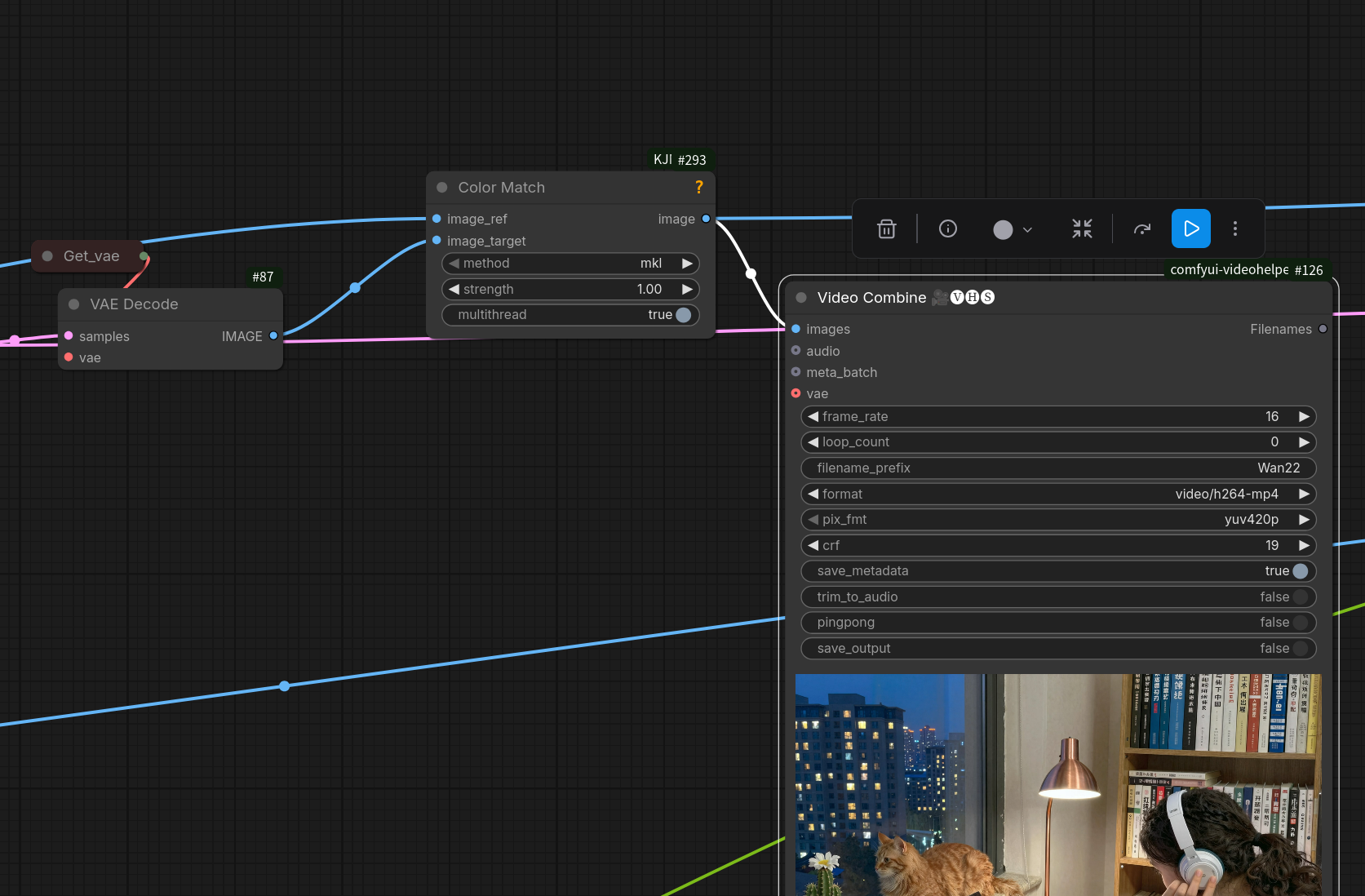
Just choose one reference image and Color Match every frame of the generated video to it.
Note other color matching nodes: link