wanx-troopers
Z-Image-Turbo
See Also
2026.05-2026.06
HF:RunDiffusion/Juggernaut-Z-Image-Fast released. HF:RunDiffusion/Juggernaut-Z-Image released. Juggernaut Prompt Guide.
“luminescent strands” for lense distortion and flares
huddadudd:
res2s normal 10 step, its about as basic a zit wf as possible huddadudd-simplest-ever-zit i vary the steps but 15 is on the high end, usually 10-12

shotgun messiah:
consider trying the Realtime LoRA block editor, if that’s your style you could get lost in this rabbithole of blocks I usually like to just do swaps, like LoRA A will do blocks 1-12, LoRA B will do blocks 13-24 etc in other words I found the best results, when that respective LoRA controls the whole block, instead of like mixing them together like you mix and match the actual blocks but for this strategy you kinda gotta “choose” which LoRA does which block, instead of mixing like mixing works too I just find this a little more stable
patientx:
I use base + turbo and turbo is good as a refiner and yes I think it can do higher res.
StillLearning:
I wouldn’t go near ZIT for base creation but it’s an excellent refiner.
Tencent released Z-Image 6B with pixel space gen. No VAE & 1k Resolution HF:zhen-nan/L2P, Apache licensed. HF:tsolful/Z-Image-L2P-INT8. Draft ComfyUI PR#14055, not merged as of 2026.05.28. WF from tsolful tsolful-Z-Image-L2P. WF uploaded by “uncertain where I got wf” buggz: buggz-ZturbotoPiDv2
BNP4535353: HF:capitan01R/ComfyUI-CapitanZiT-Scheduler
huddadudd: zit i usually just use res2 normal 10-12 steps
BNP4535353: I had an in-depth conversation with this author, who believes that some mainstream schedulers are not able to unleash the full potential of the model.
BNP4535353: Zit requires very few steps, and each step is full of power.
huddadudd: yeah zit best left simple i think
ramonguthrie:
KJ ideogram prompt builder node, kinda works with Z-Image-Turbo too, but you need to be watchful of tokens and use them wisely, so you don’t get compositional prompt drift
2026.04
z image for realism is amazing with low 0.2 denoise and fast
2025.12.31
For slightly higher contrast and a bit more color midpoint_2s
2025.12.30
A new distilled version of Z-Image called TwinFlow was released, capable of producing results in as few as 2-4 steps instead of the standard 8. HF:azazeal2/TwinFlow-Z-Image-Turbo-repacked
res4lyf bongtangent is the scheduler to use
Lemuet:
IMO it’s not really worth it other than as an experiment, supposedly can do very low step (2-4) but quality to me just looks like doing low steps with stock z-image but with a baked-in high cfg look, so it looks softer and higher contrast but result is fuzzy for high frequency details. Other than getting that cfg look at low steps (which stock z-image can’t do), I don’t see an advantage to using that model over stock one.
2025.12.27
Lemuet:
People are using latent upscale with z-image because the artifacts are somehow being interpreted as “hey this should be sharp and detailed” by the model. But it is technically a terrible way to upscale an image, you need high denoise to hide the artifacts. Upscaling a latent that way is basically like downscaling the image by 8, then upscaling by 1.5. So it’s really pixelated + other artifacts.
That’s why latent upscale needs at least 0.5 denoise.
2025.12.26
Curated collection of images and prompts generated by z-image-turbo: GH:camenduru/awesome-z-image-turbo
give zimage more direction…. it just needs it in a format it can’t ignore. {background: details here, body: Legs: muscular, tan, with a tattoo of a anchor on his upper left thigh” Works really well for character, background, layout, etc.
2025.12.15
Latent Hybrid Upscale from was_hybrid_latent_upscale. “Using laplacian edge detection to create a mask for edges where the hard jankies will show up, and replacing it with a donar latent with smooth edges (normal Image Resize upscale and encoded).”
“9 steps are considered the optimum” … “I use 8”
“res_2s/bong_tangent … don’t care about speed”
LeMiCa - a cache to skip steps, quality seems to be hit, PR to add ZIT support to LeMiCa
2025.12.13
Z-Image-Turbo-Fun-Controlnet-Union-2.0 released adding inpaint ability.
ControlNet Union support for Z-Image-Turbo is present in ComfyUI.
Despite “ControlNet” name technically this is closer to VACE than to ControlNet-s of the past.
The new Controlnet-Union supports Pose, Canny, Hed, and Depth guidance.
One more alternative CLIP for z-image-turbo: BennyDaBall/qwen3-4b-Z-Image-Engineer; contains
- qwen3-4b-Z-Image-Engineer_v1-f16.gguf
- Qwen3-4b-Z-Engineer-V2.gguf
Scruffy lists the following options so there may be more “engineers” around: JosieEngineer1, JosieV2, Engineer2, ShortStory
VRGameDevGirl has shared
a powerful upscaling workflow using Z-Image-Turbo with Union Controlnet (AnyImageZImageUpscaleWithCN.json)
along with other workflows in GH:vrgamegirl19/comfyui-vrgamedevgirl:Workflows/Z-ImageUpscale.
Note: ZImageUSD there is an Ultimate SD Upscaler workflow with Z-Image-Turbo model plugged in.
in my testing Z Image doesn’t need a lot of upscaling, just gen at 1440 and looks quite good
the reason behind doing it this way instead of doing just the normal latent upscale to 2K is because anything over 1024 looses details from the org image; doing it with USD does not because the tile size is at 1024 a few days ago we found this out, anything over 1024 looses alot of detail
the Hugging Face demos feature choosing between 1024, 1280 and 1536 so those are probably the best resolutions to shoot for
ust 2 methods of getting to a 2MP image - 1) Via 1k + 2x Latent Upscale and 2) via native 1920 gen in the first place; 1920 might be stretching abilities of the model
lower ETA to get more noise/texture, and higher denoise will increase realism [in an upscaling wf]
Possible alternative VAE trained on 4k images and possibly delivering a bit more detail: UltraFlux VAE; though reactions are not fantastic.
2025.12.10
GH:RamonGuthrie/ComfyUI-RBG-SmartSeedVariance ComfyUI node injecting varience into Z-Image-Turbo generations by applying noise to text.
2025.12.06
found the biggest benefit to running z-image came from having qwen 8b instruct write the prompts; 4b instruct is a close second
Can anyone suggest the best k-sampler settings for realistic outputs? Euler ancestral and bong tangent are a killer combo. Possibly er_sde & sgm_uniform
ZIT is said to have “ruts” - tendency for repetition: “ruts are medium shot, certain people, certain angles” - because it is distilled.
using a model like Josie that isn’t ‘the same old’, causes Zimage to hit ‘less’ ruts. It’s reintroducing triggering tokens finding remaining less used paths that aren’t gone but are avoided in favor of the rut.
2025.12.05
Z-Image-Turbo consists of 3 parts
- variant of Qwen3 LLM - prompt is passed through most of LLM layers and results are taken out after meaning has been encoded but before they were used to guess the next word
- Z-Image-Turbo core - that’s where image generation happens
- VAE - converts results from latent space to pixel space
Scruffy has suggested using alternative flavor of Qwen3 and an alternative VAE in order to improve Z-Image-Turbo results. His currently preferred LLM is Josiefied-Qwen3-4B-Instruct-2507-gabliterated-v2 and his currently preferred VAE is G-REPA/Self-Attention-W2048-3B-Res256-VAEFLUX-Repa0.5-Depth8-Dinov2-B_100000 VAE.
Apparently these can be downloaded separately.
Scruffy has also assembled all three components into a all-in-one 33 Gb .safetensors which he called JoZiMagic.
Note: had we not been limited by VRAM on present generation of consumer video cards we could have used a bigger version of LLM, namely
Goekdeniz-Guelmez/Josiefied-Qwen3-14B-abliterated-v3. Note: Z-Image-Turbo uses Flux.1 style VAE. Flux.2 VAE meanwhile is apache licensed
and likely to get used for new models in the future.
Mysterious “shift” formula from Scruffy:
(<base_shift> - <max_shift>) / (256 - ((<image_width> * <image_height>) / 256)) * 3840 + <base_shift>
Decrease in image quality and composition has been reported above 2048 resolution.
Getting images to as high resolution as possible is a popular endeavor withing the community. Latent Upascale node is being used normally after the sampler.
2025.11.26
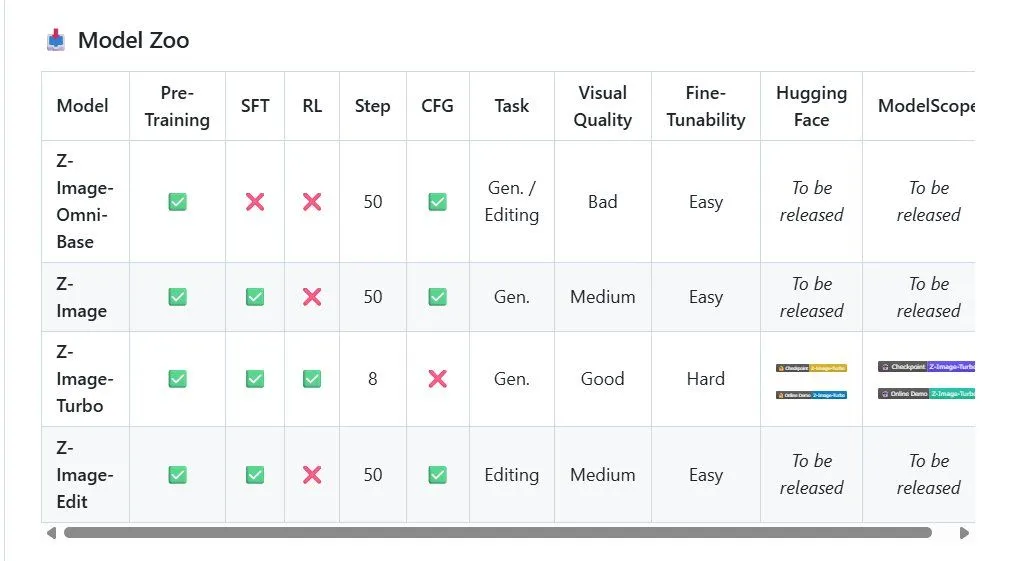
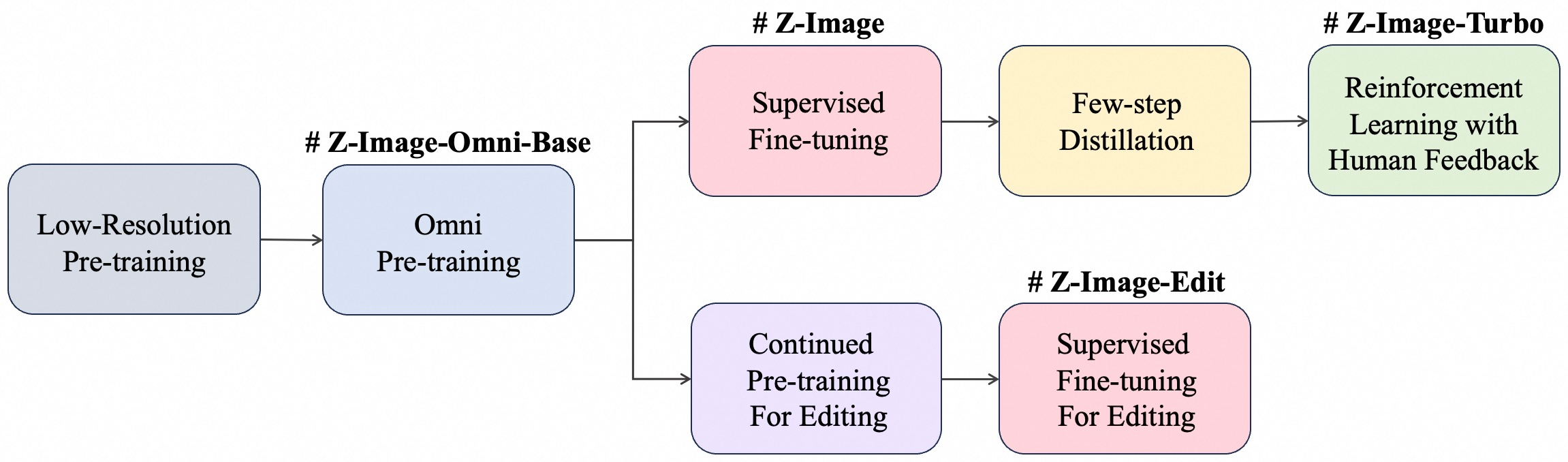
6B Z-Image-Turbo is a distilled image generation model released under Apache license. Community is raving :) Model re-uses Flux VAE but appears not be based on Flux.
Model page promises non-distilled and edit versions to be released. “beats flux 2 .. at a fraction of the size … less plastic than qwen image”.
Limitation: only one LoRa can be successfully applied. Applying a combination leads to bad results, probably because Z-Image-Turbo is highly distilled.
The stock ComfyUI workflow for z-image is quite traditional: Clip Encoder users qwen_3_4b to encode user prompt and feed it to KSampler.
The surprise is that Z-Image-Turbo had been trained on conversation sequences which have then been encoded by qwen_3_4b.
A number of projects have emerged to help take advantage of this. Most prominently there is GH:fblissjr/ComfyUI-QwenImageWanBridge. As the explanation says:
There’s no LLM running here. Our nodes are text formatters - they assemble your input into the chat template format, wrap it with special tokens, and pass it to the text encoder. The “thinking” and “assistant” content is whatever text YOU provide.
If using an LLM the project recommends using “Qwen3-0.5B through Qwen3-235B” because they also use qwen_3_4b and tokens produced by them are passed without re-encoding.
Then there are other projects which do make use of LLM-s to help generate the prompt. One is discussed here.
Qwen-3B Layers
Qwen-3B has been described as passing the text through the following layers
Input tokens
      ↓
  [Embedding layer]
      ↓
  Layer 1  (-36)  ← earliest, closest to raw input
  Layer 2  (-35)
  ...
  Layer 18 (-19)  ← middle
  ...
  Layer 35 (-2)   ← Z-Image default
  Layer 36 (-1)   ← LAST, just before vocab projection
      ↓
  [LM Head → logits → token prediction]
By default z-image-turbo is getting Qwen-3B output from the line marked with -2. However it is technically possible to modify ComfyUI code such that the image is produced based on Qwen3 output from any of the earlier layers. Some of them result in gibberish but many will result in images, different from the one we get by default. We probably should expect it to be implemented - some time soon?.. Node to select last layer by Scruffy: CLIPSetLastLayer.py
Older
GH:PGCRT/CRT-Nodes added LoRA Loader (Z-Image)(CRT). It can load zit-ivy.safetensors
AIO for ZIT: HF:SeeSee21/Z-Image-Turbo-AIO
Notable LoRA-s And WF-s
- detail-slider note: strength can be -2 to +2, greater values mean more details
- detaildeamonz note: strength can be -2 to +2, greater values mean less details
- cinematic-shot
- “Mostly Civitai, but add in HF, especially MalcolmRey’s LoRAs”
Luneva LoRAs
- https://civitai.com/models/2185167/midjourney-luneva-cinematic-lora-and-workflow Cynamatic, a bit MJ-like
- https://civitai.com/models/2215818/luneva-cyber-hd-enhancer Cyber + HD Enhancer
- https://civitai.com/models/2226355?modelVersionId=2506390 “Infinite Detail” workflow and LoRAs, a bit gloomy
Litch
- https://civitai.com/models/2235896?modelVersionId=2517015 Smarktphone Snapshot Reality [STYLE] - wf included in sample img
Ultra-Realist Style from WAS
See Alos
- LLM Nodes
- GH:by-ae/ae-in-workflow interactive pose editor (for images) - no hands though
- GH:LAOGOU-666/ComfyUI-LG_SamplingUtils - untested, some sort of utilites to inject extra latent noise etc
- CA:2600698/realstagram workordie’s Z-Image LoRa for mixing with character LoRa-s
Hypothetical List of Resolutions To Go For
Composed by Madevilbeats:
--1024--
1024x1024 ( 1:1 )
1152x896 ( 9:7 )
896x1152 ( 7:9 )
1152x864 ( 4:3 )
864x1152 ( 3:4 )
1248x832 ( 3:2 )
832x1248 ( 2:3 )
1280x720 ( 16:9 )
720x1280 ( 9:16 )
1344x576 ( 21:9 )
576x1344 ( 9:21 )

-- 1280 --
1280x1280 ( 1:1 )
1440x1120 ( 9:7 )
1120x1440 ( 7:9 )
1472x1104 ( 4:3 )
1104x1472 ( 3:4 )
1536x1024 ( 3:2 )
1024x1536 ( 2:3 )
1600x896 ( 16:9 )
896x1600 ( 9:16 )
1680x720 ( 21:9 )
720x1680 ( 9:21 )

--1536--
1536 × 1536 (1:1)
1728 × 1344 (9:7)
1344 × 1728 (7:9)
1728 × 1296 (4:3)
1296 × 1728 (3:4)
1728 × 1248 (3:2)
1248 × 1872 (2:3)
2048 × 1152 (16:9)
1152 × 2048 (9:16)
2016 × 864 (21:9)
864 × 2016 (9:21)
Workflows
- ZImage_CN_MOIRE by Dream Making requires nodes to be released into GH:scruffynerf/scromfyUI_Nodes in 2026
- ZImage_Details_Inject.json also by Dream Making requires GH:RamonGuthrie/ComfyUI-RBG-SmartSeedVariance
- DawnII_KritaZImageInpaint dy Dawn - Z-Image custom comfyui inpainting workflow
requires
Fooocus_KSamaplerEfficientfromcomfyui-art-venturenode pack; “although you can use any sampler … I like the sharpness adjustment on it”; “for anyone familiar with Krita here is a custom comfyui workflow for inpainting” - ZIT_Luneva_Infinite_Detail_Workflow Luneva’s WF modified by Litch; “so you basically ran it through seedvr after?” “yeah; But I prefer to run seedvr after the first pass”
Fun Infographics
2025.12.24